


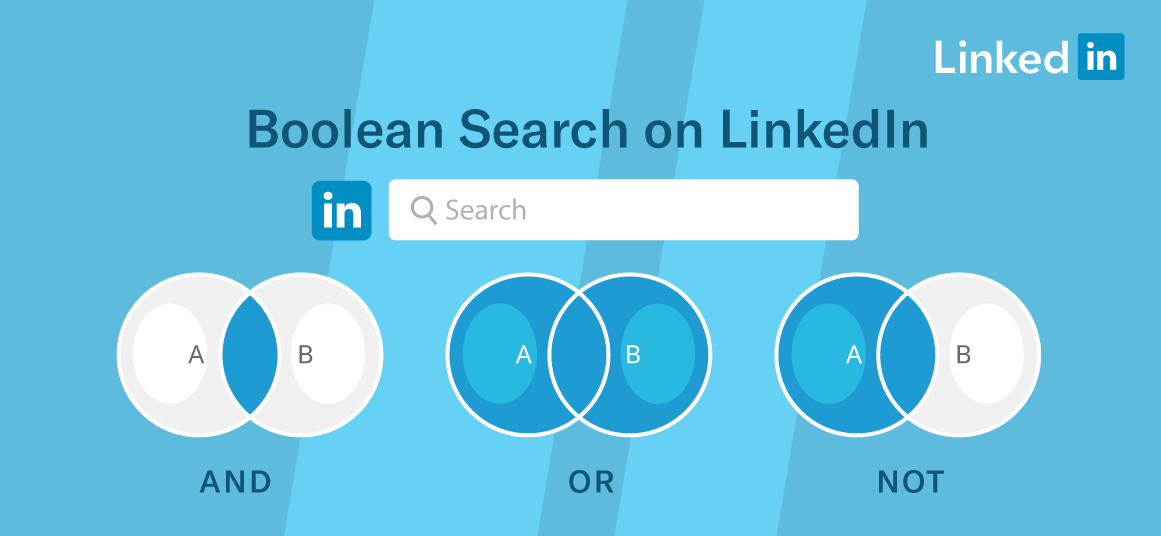


Boolean search combines keywords with operators such as AND, OR and NOT to refine the results of a job search.
Quotation marks, parentheses and capitalised operators are the basic rules for getting reliable results.
In a Luxembourg market where the number of jobseekers is rising, mastering Boolean search can help you stand out.
Looking for a job is no longer just a matter of browsing listings, but of efficiently sorting through an abundant supply. On 31 August 2026, ADEM counted 20,136 resident jobseekers available and registered, 11.5% more than a year earlier, with an unemployment rate of 6.5% calculated by STATEC.
For candidates, knowing how to use Boolean search and the well-known "Boolean operators", an advanced search technique, helps bring relevant offers to the surface among the many listings published online.
Boolean search consists of combining keywords with logical operators to describe precisely what you are looking for. Its name refers to the English mathematician George Boole, who laid the foundations of Boolean algebra in the 19th century. John Kim, co-founder of Paraform, compares this technique to "a secret language" for refining searches on LinkedIn in his guide published in April 2024. Long reserved for recruiters, Boolean search applies just as well to candidates.
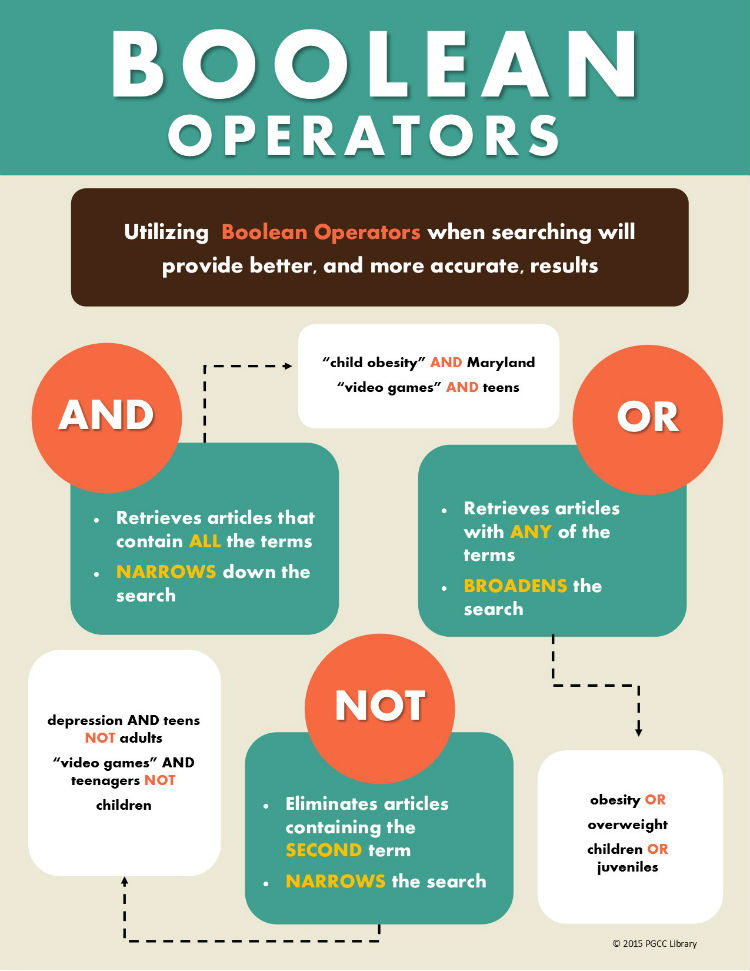
Three operators, known as "Boolean operators", form the basis of this method. They are always typed in capitals in the search field, and they are AND, OR and NOT:
AND: This operator combines two or more keywords and returns results that contain all the keywords. For example, a search for “sales AND marketing” will return results that contain both “sales” and “marketing.”
OR: This operator is used to combine two or more keywords and return results that contain at least one of the keywords. For example, a search for “sales OR marketing” will return results that contain either “sales” or “marketing,” or both.
NOT: This operator excludes certain keywords from the search results. For example, a search for “sales NOT marketing” will return results that contain “sales” but not “marketing.”
Straight quotation marks are used to search for an exact phrase made up of several words, for example "product manager", and parentheses make it possible to group terms, as in ("content writer" OR copywriter) NOT "content manager", an example taken from IE University's career guide. As for the asterisk, which replaces the end of a word, it is recognised by most job sites, but not by all search engines.
” “ : This operator is used to search for an exact phrase. For example, a search for “ “sales manager” ” will return results that contain the exact phrase “sales manager.”
( ) : This operator is used to group keywords together and to apply the operator to a specific set of keywords. For example, a search for ” (sales OR marketing) NOT (manager OR director) “ will return results that contain either “sales” or “marketing” but not “manager” or “director.”
On LinkedIn, the first step of a Boolean search is to list the job titles you are targeting and their variants. Think about alternative titles, abbreviations and spellings, then start with a broad search before refining it. You then link these terms with OR, add skills or the sector with AND, and exclude unwanted results with NOT.
It is also possible to combine a Boolean search query with the platform's filters. Kareem Abukhadra's blog on job searching on LinkedIn shows, for example, a query combining several job titles with a filter limited to listings published during the past week. Indeed, a listing published more than a week ago is quite likely to have already been filled.
The site HireQuotient also points out that a query can be saved on LinkedIn to track new offers, which avoids having to type the same search again.
A candidate is looking for a compliance manager position in Luxembourg on a fixed-term or permanent contract:
("compliance officer" OR "responsable conformité" OR "compliance-beauftragter") AND Luxembourg NOT stage
This Boolean search query covers three languages with the OR operator, which is useful in a multilingual market like Luxembourg, adds the Luxembourg location with the AND operator, and excludes internship listings by using the NOT operator.
The most common mistakes are easy to fix. According to CS Recruiters, which draws on a MongoDB guide, operators written in lowercase, missing parentheses and overuse of NOT are among the main reasons a Boolean search gives poor results. The site recommends testing and adjusting the query rather than settling for a single attempt.
Another pitfall concerns typography. As Greenhouse points out, a query copied from Word may contain typographic quotation marks, which are incompatible with a Boolean search, and it advises typing them by hand or copying without formatting. It is therefore best to write your queries in a plain text editor before pasting them into the search engine.
Finally, Boolean search remains one tool among others. It makes it easier to sort listings, but it does not replace a tailored CV, a polished LinkedIn profile or the activation of your professional network. Used methodically, it above all saves time, a real advantage in a market where the number of jobseekers is rising.
Boolean search relies on a few easy-to-remember rules: capitalised operators, quotation marks for exact phrases and parentheses to structure the query.
Well mastered, Boolean search helps candidates target offers, translate their keywords into several languages and save time. To improve, the most effective approach is still to test several queries, adjust them and save them.
What is Boolean search and what are Boolean operators?
It is a search method that combines keywords with logical "operators" such as AND, OR and NOT. It makes it possible to refine results on LinkedIn or on job sites.
Which operators should you use to look for a job?
AND limits results to listings containing all the terms, OR broadens the search and NOT excludes a word. Quotation marks and parentheses complete the method.
Does Boolean search work the same way everywhere?
Not always: some tools do not recognise all operators, such as the asterisk. You should therefore test your query on each platform and type the operators in capitals.
Cover image : Dripify




.jpg)